Slash Commands
Slash commands are the main type of application command,
executed on Discord by typing a slash (/), followed by the command's name and arguments.
Slash commands registered by your bot are visible in a menu displayed above Discord's message input box when a user
types a slash (/), allowing them to browse a list of all available commands,
and providing information on their descriptions and arguments.
You should register slash commands as part of your bot's startup process, by calling the relevant builder functions in
your extension's setup function.
However, if necessary, you can also register them dynamically by calling the same functions after your bot connects to
Discord.
If you do this, your bot will immediately register the command with Discord,
so be aware of Discord's strict rate limits.
publicSlashCommand(::MyArguments) {
    name = Translations.Commands.Ping.name
    description = Translations.Commands.Ping.description

    check { hasPermission(Permission.MentionEveryone) }

    action {
        respond {
            // Note: Slash commands usually can't mention people, this is just an example.

            content = "Hey, ${arguments.user.mention}! Get pinged!"
        }
    }
}
Argument Parsing
Like all command types, chat commands parse their arguments in the order you defined them, allowing converters that take lambdas to reference previous arguments. However, because Discord handles most of the parsing logic, the work your bot needs to do is minimal.
Despite this, it is worth remembering a few things:
- Slash commands don't support list converters, and these arguments will receive a list with a single value at most.
- Most converters for types that Discord doesn't support will look like string arguments in the Discord client. We recommend you write auto-completion into your arguments whenever possible.
- Choice converters work as you'd expect, but Discord limits them to 25 options. If you need more, use auto-completion instead.
- Slash commands can't accept newline characters, which means all string arguments will always be on a single line.
- Modals support paragraph inputs, and this is Discord's official solution to that problem.
When writing your own converters, remember that users can provide mentions in string arguments, which we feel may be useful in a small handful of situations.
Extension API
The following APIs are available on the Extension type,
which you can use to define your chat commands and modify their behaviour.
Use this builder to register a slash command based on an ephemeral interaction flow.
Optional callable returning an instance of your Arguments subtype,
as explained on the arguments page.
You'll usually want to pass a constructor here.
Optional callable returning an instance of your ModalForm subtype,
as explained on the modals page.
You'll usually want to pass a constructor here.
Optional generic type referring to your Arguments subtype, as explained on
the arguments page.
Optional generic type referring to your ModalForm subtype, as explained on
the modals page.
Use this builder to register a slash command based on a public interaction flow.
Optional callable returning an instance of your Arguments subtype,
as explained on the arguments page.
You'll usually want to pass a constructor here.
Optional callable returning an instance of your ModalForm subtype,
as explained on the modals page.
You'll usually want to pass a constructor here.
Optional generic type referring to your Arguments subtype, as explained on
the arguments page.
Optional generic type referring to your ModalForm subtype, as explained on
the modals page.
Register a check that must pass for any of the slash commands in this extension to run.
Standalone Commands
Standalone commands are the simplest type of slash command, defined using the builder functions above.
These builders are a receiver against the corresponding SlashCommand subtype, providing APIs you can use to configure
your command and its metadata.
At minimum, a slash command must have a name and description defined.
Standalone commands must also have an action defined.
The following APIs are available for use when writing a slash command, along with those provided by
the base ApplicationCommand type.
Builders
Register your command's action block, defining what it will do when executed. See the context API section for more information on what you can do here.
If your command has any groups or subcommands, it can't have an action, so don't use this builder.
If you provided a modal form constructor when you defined the command, users will be prompted with a modal when
they execute it.
This argument will be an instance of your ModalForm when they submit the modal.
This argument will also be null if the user takes longer than 15 minutes to submit the modal,
and Discord will prevent your bot from responding.
It will also be null if you didn't define a modal for this command.
Properties
This command's description, shown on Discord and in argument parsing errors.
String representing a clickable mention, which you can send on Discord.
This is meant to be used after the command is registered, and will always be null before your bot has finished
setting up.
It will also be null if you aren't using Kord Extensions' default application command registry.
Nested Commands
You can nest slash commands in two ways, which you can combine:
- Define command groups within your top-level command, and define subcommands within those groups.
- Define subcommands directly within your top-level command.
Discord shows nested commands alongside standalone commands, and users can't execute the top-level command.
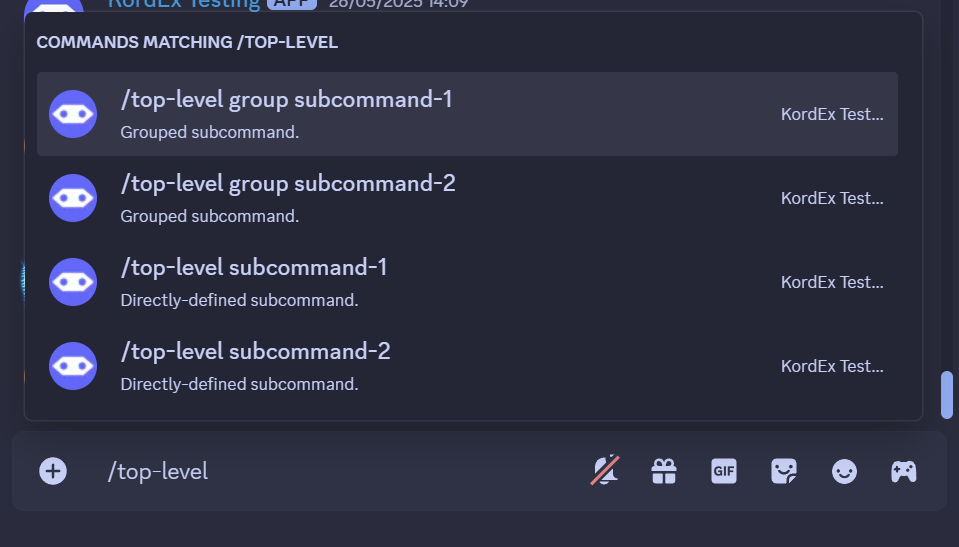
Command Groups
To define a command group, use the group() { } builder in your top-level command builder.
Command groups must define a name and description, and must contain at least one subcommand.
Group name, shown on Discord.
The SlashGroup type exposes some APIs, available within your group() { } builder.
Builders
Use this builder to register a subcommand based on an ephemeral interaction flow.
This builder has an identical API to the ephemeralSlashCommand builder, used to define
standalone commands.
Use this builder to register a subcommand based on a public interaction flow.
This builder has an identical API to the publicSlashCommand builder, used to define
standalone commands.
Properties
Group description, shown on Discord.
Subcommands
To define a subcommand, use the corresponding builder function mentioned below.
Subcommands must define a name, description and action.
Use this builder to register a subcommand based on an ephemeral interaction flow.
This builder has an identical API to the ephemeralSlashCommand builder, used to define
standalone commands.
Use this builder to register a subcommand based on a public interaction flow.
This builder has an identical API to the publicSlashCommand builder, used to define
standalone commands.
Context API
The action { } builder is a receiver against the SlashCommandContext type.
This type provides a set of APIs, along with those provided by
the base ApplicationCommandContext type,
which allow your bot to respond to slash command invocations.
Properties
Object containing this command invocation's parsed arguments,
matching the type of the subtype you provided to your command definition,
or an empty Arguments object if you didn't provide one.
Reference to the object representing the current command.
Reference to the event that triggered this command invocation.