Context Commands
Context commands are a special type of application command, invoked by users via a right-click or tap-and-hold "Apps" menu in their Discord client. Instead of arguments, context commands receive whatever the user was targeting when they opened the menu.
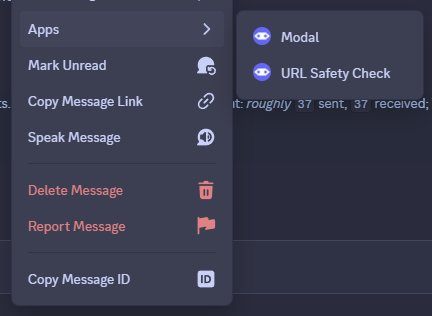
Two types of context commands exist: message and user.
They have identical APIs, aside from the type of data Discord supplies to them.
You should register context commands as part of your bot's startup process, by calling the relevant builder functions in
your extension's setup function.
However, if necessary, you can also register them dynamically by calling the same functions after your bot connects to
Discord.
If you do this, your bot will immediately register the command with Discord,
so be aware of Discord's strict rate limits.
Extension API
Use this builder to register a message command based on an ephemeral interaction flow.
Optional callable returning an instance of your ModalForm subtype,
as explained on the modals page.
You'll usually want to pass a constructor here.
Optional generic type referring to your ModalForm subtype, as explained on
the modals page.
Use this builder to register a user command based on an ephemeral interaction flow.
Optional callable returning an instance of your ModalForm subtype,
as explained on the modals page.
You'll usually want to pass a constructor here.
Optional generic type referring to your ModalForm subtype, as explained on
the modals page.
Use this builder to register a message command based on a public interaction flow.
Optional callable returning an instance of your ModalForm subtype,
as explained on the modals page.
You'll usually want to pass a constructor here.
Optional generic type referring to your ModalForm subtype, as explained on
the modals page.
Use this builder to register a user command based on a public interaction flow.
Optional callable returning an instance of your ModalForm subtype,
as explained on the modals page.
You'll usually want to pass a constructor here.
Optional generic type referring to your ModalForm subtype, as explained on
the modals page.
Register a check that must pass for any of the message commands in this extension to run.
Register a check that must pass for any of the user commands in this extension to run.
Message Commands
You can register a message command using the corresponding builder functions explained above.
All message commands must define a name and action.
Message commands don't support arguments, but you can still provide a ModalForm subtype to prompt the user with a modal, similarly to how slash commands work.
publicMessageCommand {
    name = Translations.Commands.GetMessage.name

    action {
        val target = targetMessages.first()

        respond {
            content = "Target: ${target.getJumpUrl()}"
        }
    }
}
Message commands don't expose any extra APIs, aside from an action { } builder and those provided by the
base application command type they extend.
However, along with the basic context APIs,
the message command context provides a targetMessages property containing a list of targeted messages.
While Discord provides a list of target messages, it is impossible for users to target more than one message in the Discord client — at least, as of this writing. We think Discord intended to make it possible to specify multiple messages, but this never made it into the client.
We decided to mirror Discord's choice, as this might become possible at some point in the future.
User Commands
You can register a user command using the corresponding builder functions explained above.
All user commands must define a name and action.
User commands don't support arguments, but you can still provide a ModalForm subtype to prompt the user with a modal, similarly to how slash commands work.
publicUserCommand(::GreetModal) {
    name = Translations.Commands.GreetUser.name

    action { modal ->
        modal ?: return@action

        val target = targetUsers.first()

        respond {
            content = "${modal.greeting.value} ${target.mention}"
        }
    }
}
User commands don't expose any extra APIs, aside from an action { } builder and those provided by the
base application command type they extend.
However, along with the basic context APIs,
the user command context provides a targetUsers property containing a list of targeted user.
While Discord provides a list of target users, it is impossible for users to target more than one user in the Discord client — at least, as of this writing. We think Discord intended to make it possible to specify multiple users, but this never made it into the client.
We decided to mirror Discord's choice, as this might become possible at some point in the future.