General Steps
When you run into a problem that you can't figure out on your own, the first thing you should learn is how to help yourself figure things out. We've put together a list of things you should look at first below, and we recommend quickly running through this page before moving on to more specific troubleshooting pages.
Investigation
A competent Kotlin IDE (like IntelliJ IDEA) can help you navigate the Kord Extensions source code alongside your own, and even set breakpoints in it.
When using IDEA, we suggest making these steps a habit:
- Download the Kord Extensions sources in your IDE.
You can do this using the "Download Sources" button in the Gradle tab.

- Figure out where your problem happens, and set some breakpoints by clicking on the line numbers.
- Run your bot in debug mode (the bug icon in the top toolbar).
If you've never run your bot in your IDE, you'll need to run the
devGradle task (listed in the Gradle sidebar) to create a run configuration first. - Trigger a breakpoint, examine the surrounding data, and use
Ctrl+ClickorCmd+Clickto navigate to other parts of your code, or the Kord Extensions code. - Take your time, and try to figure things out.
If you've done everything on this page, and the more specific troubleshooting pages don't help, feel free to ask for help in our community spaces.
Unhelpful Errors
Sometimes, you'll run into an exception that looks like this:
dev.kord.rest.request.KtorRequestException: REST request returned an error: 403   Missing Access null
    at dev.kord.rest.request.KtorRequestHandler.handle(KtorRequestHandler.kt:60)
    at dev.kord.rest.request.KtorRequestHandler$handle$1.invokeSuspend(KtorRequestHandler.kt)
    at kotlin.coroutines.jvm.internal.BaseContinuationImpl.resumeWith(ContinuationImpl.kt:33)
    at kotlinx.coroutines.DispatchedTask.run(DispatchedTask.kt:100)
    at kotlinx.coroutines.scheduling.CoroutineScheduler.runSafely(CoroutineScheduler.kt:586)
    at kotlinx.coroutines.scheduling.CoroutineScheduler$Worker.executeTask(CoroutineScheduler.kt:829)
    at kotlin.coroutines.jvm.internal.BaseContinuationImpl.resumeWith(ContinuationImpl.kt:33)
    at kotlinx.coroutines.DispatchedTask.run(DispatchedTask.kt:100)
    at kotlinx.coroutines.scheduling.CoroutineScheduler.runSafely(CoroutineScheduler.kt:586)
    at kotlinx.coroutines.scheduling.CoroutineScheduler$Worker.executeTask(CoroutineScheduler.kt:829)
    at kotlinx.coroutines.scheduling.CoroutineScheduler$Worker.runWorker(CoroutineScheduler.kt:717)
    at kotlinx.coroutines.scheduling.CoroutineScheduler$Worker.run(CoroutineScheduler.kt:704)
This error isn't very helpful — it doesn't include our bot's code in the traceback, and the only information it gives
us is 403 Missing Access null:
- The
403 Missing Accessis part of the HTTP response from Discord, specifically the response status code. - The
nullis a field Discord provides, meant to contain a human-readable error message or JSON object with more details, but that's missing here.
The first thing you should do here is enable Kord's stack-trace recovery feature. You can do this via the Kord configuration builder:
val bot = ExtensibleBot(TOKEN) {
    // ...

    kord {
        stackTraceRecovery = true
    }
}
If you can reproduce the problem in development mode, consider setting this to devMode instead of true, as it can
slow your bot down a little.
Now we've set this, our bot gives us an error more like the following:
dev.kord.rest.request.KtorRequestException: REST request returned an error: 403   Missing Access null
    at dev.kord.rest.request.KtorRequestHandler.handle(KtorRequestHandler.kt:60)
    at dev.kord.rest.request.KtorRequestHandler$handle$1.invokeSuspend(KtorRequestHandler.kt)
    at kotlin.coroutines.jvm.internal.BaseContinuationImpl.resumeWith(ContinuationImpl.kt:33)
    at kotlinx.coroutines.DispatchedTask.run(DispatchedTask.kt:100)
    at kotlinx.coroutines.scheduling.CoroutineScheduler.runSafely(CoroutineScheduler.kt:586)
    at kotlinx.coroutines.scheduling.CoroutineScheduler$Worker.executeTask(CoroutineScheduler.kt:829)
    at kotlin.coroutines.jvm.internal.BaseContinuationImpl.resumeWith(ContinuationImpl.kt:33)
    at kotlinx.coroutines.DispatchedTask.run(DispatchedTask.kt:100)
    at kotlinx.coroutines.scheduling.CoroutineScheduler.runSafely(CoroutineScheduler.kt:586)
    at kotlinx.coroutines.scheduling.CoroutineScheduler$Worker.executeTask(CoroutineScheduler.kt:829)
    at kotlinx.coroutines.scheduling.CoroutineScheduler$Worker.runWorker(CoroutineScheduler.kt:717)
    at kotlinx.coroutines.scheduling.CoroutineScheduler$Worker.run(CoroutineScheduler.kt:704)
    Suppressed: dev.kord.rest.request.RecoveredStackTrace: This is the recovered stack trace:
        at dev.kord.rest.service.ChannelService.getMessage(ChannelService.kt:539)
        at dev.kord.core.supplier.RestEntitySupplier.getMessageOrNull(RestEntitySupplier.kt:115)
        at dev.kord.core.supplier.StoreEntitySupplier.getMessageOrNull(StoreEntitySupplier.kt:74)
        at dev.kord.core.supplier.FallbackEntitySupplier.getMessageOrNull(FallbackEntitySupplier.kt:54)
        at dev.kord.core.behavior.MessageBehavior$DefaultImpls.asMessageOrNull(MessageBehavior.kt:62)
        at dev.kord.core.behavior.MessageBehaviorKt$MessageBehavior$1.asMessageOrNull(MessageBehavior.kt:226)
        at dev.kordex.modules.pluralkit.PKExtension$setup$3$1.invokeSuspend(PKExtension.kt:145)
        at dev.kordex.modules.pluralkit.PKExtension$setup$3$1.invoke(PKExtension.kt)
        at dev.kordex.modules.pluralkit.PKExtension$setup$3$1.invoke(PKExtension.kt)
        at dev.kordex.core.events.EventHandler.call(EventHandler.kt:196)
        at dev.kordex.modules.pluralkit.PKExtension$setup$$inlined$event$default$3$1.invokeSuspend(ExtensibleBot.kt:590)
        at dev.kordex.modules.pluralkit.PKExtension$setup$$inlined$event$default$3$1.invoke(ExtensibleBot.kt)
        at dev.kordex.modules.pluralkit.PKExtension$setup$$inlined$event$default$3$1.invoke(ExtensibleBot.kt)
        at dev.kordex.modules.pluralkit.PKExtension$setup$$inlined$event$default$3$3$1.invokeSuspend(ExtensibleBot.kt:422)
        ... 6 common frames omitted
As you can see, this points at our code, and helps us find the specific block of code causing this problem.
Alternative: Sentry
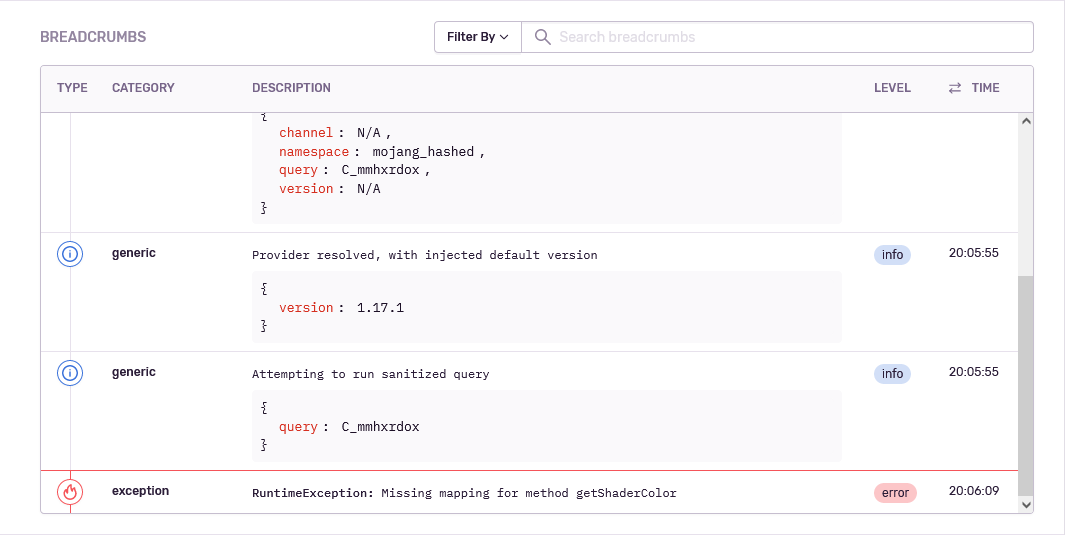
If you're using the Sentry integration (TODO), consider creating breadcrumbs in your commands and event handlers. Breadcrumbs keep track of what your code has been doing, and they can provide extra context when looking at exceptions in Sentry:
action {
    sentry.breadcrumb(BreadcrumbType.Debug) {
        message = "Loading tag from database..."

        user = this@action.user

        data["tag.name"] = arguments.tag
    }

    val tag = getTag(arguments.tag)

    if (tag != null) {
        sentry.breadcrumb(BreadcrumbType.Debug) {
            message = "Tag loaded, responding..."
            channel = this@action.channel

            data["tag.name"] = arguments.tag
            data["tag.content"] = tag.content
        }

        respond {
            // ...
        }
    }
}
This will give you a new panel in Sentry — example here taken from the mappings module (TODO):